
Introduction to Apple Music Player
Music isn’t just background noise—it’s a companion, a mood-setter, and sometimes a lifesaver on a rough day. That’s where the Apple Music player steps in, acting like a digital jukebox that never runs out of records. Whether you’re commuting, working out, or zoning out at 2 a.m., Apple Music makes sure your favorite tunes are always within reach.
- Introduction to Apple Music Player
- What Is Apple Music Player?
- Why Apple Music Still Matters Today
- Evolution of the Apple Music Player
- From iTunes to Apple Music
- How Streaming Changed the Way We Listen
- Apple’s Shift Toward Experience-Driven Music
- Key Features of Apple Music Player
- Massive Music Library
- Lossless Audio and Spatial Sound
- Dolby Atmos Explained Simply
- Apple Music Player Across Devices
- iPhone and iPad Experience
- Mac and Windows Playback
- Apple Music on Android and Smart TVs
- User Interface and Ease of Use
- Clean Design and Navigation
- Customization Options
- Discovering New Music Like a Pro
- Personalized Playlists
- Apple Music Radio and Live Shows
- Beats 1 and Artist-Led Stations
- Offline Listening and Downloads
- How Offline Mode Works
- Best Practices for Storage Management
- Apple Music Player for Music Lovers
- Lyrics, Sing-Along, and Karaoke Mode
- Music Videos and Exclusive Content
- Social and Sharing Features
- Sharing Playlists with Friends
- Following Artists and Friends
- Apple Music vs Other Music Players
- Apple Music vs Spotify
- Apple Music vs YouTube Music
- Which One Fits Your Lifestyle?
- Tips to Get the Best Sound Experience
- Headphones and Audio Settings
- EQ and Sound Customization
- Is Apple Music Worth It in 2026?
- Pricing and Plans
- Student and Family Options
- Common Problems and Easy Fixes
- Playback Issues
- Download and Sync Errors
- Future of Apple Music Player
- AI, Personalization, and Beyond
- What Users Can Expect Next
- Conclusion
What Is Apple Music Player?
At its core, the Apple Music player is Apple’s all-in-one music streaming platform. It lets you stream millions of songs, download tracks for offline listening, explore curated playlists, and enjoy studio-quality sound. Think of it as a modern record store, radio station, and personal DJ rolled into one sleek app.
Why Apple Music Still Matters Today
With so many streaming options out there, you might wonder why Apple Music still holds its ground. Simple—it focuses on quality, exclusivity, and a smooth ecosystem. If you’re already in the Apple world, Apple Music feels less like an app and more like a natural extension of your devices.
Evolution of the Apple Music Player
From iTunes to Apple Music
Once upon a time, iTunes ruled the music world. You bought songs one by one, synced them manually, and guarded your MP3 library like treasure. Apple Music flipped that script. Instead of owning tracks, you now have unlimited access—like swapping a personal bookshelf for a massive digital library.
How Streaming Changed the Way We Listen
Streaming made music instant. No downloads, no waiting. Apple Music embraced this shift and polished it with Apple’s signature design and performance. The Apple Music player evolved from a simple media tool into a full-blown entertainment hub.
Apple’s Shift Toward Experience-Driven Music
Apple isn’t just selling songs; it’s selling experiences. Spatial audio, animated album art, live radio shows—these little details turn listening into something immersive, almost cinematic.
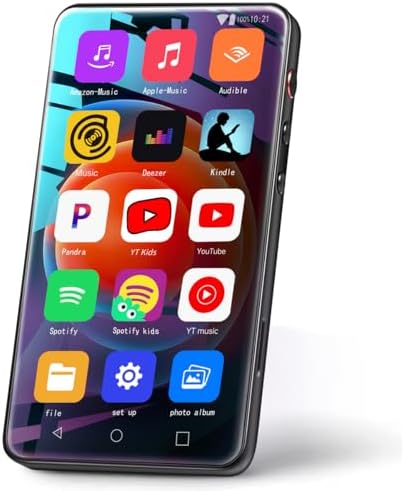
- ⛳All-in-One Entertainment Terminal:MYMAHDI ultimate MP3 player with Bluetooth and Wi-Fi, it serves as your complete ente…
- 🏆Expansive 144GB Massive Storage: Boasting a huge 144GB storage capacity (2GB RAM &16GB ROM+High-speed expansion of 128G…
- 📡New Experience of Wireless Freedom: Featuring a powerful CPU and a full Android touchscreen, MYMAHDI HiFi Android strea…


- 【Safe & Designed for Kids】 Give your child the freedom of Android without worries. It’s the portable MP3 player for kids…
- 【Joy & Ready to Use】Pre-installed Spotify, Amazon Music, Apple Music and YouTube Music—log in to start using the Spotify…
- 【Peace & Bedtime Stories】Soothing bedtime stories on Libby, Kindle, and other platforms with this Android MP3 player; a …
Key Features of Apple Music Player
Massive Music Library
Apple Music boasts over 100 million songs. From underground indie tracks to chart-topping hits, it’s all there. You can jump from 90s hip-hop to classical piano in seconds, no judgment involved.
Lossless Audio and Spatial Sound
If sound quality matters to you, Apple Music delivers. Lossless audio preserves every detail, while spatial sound makes you feel like you’re sitting in the studio with the artist.
Dolby Atmos Explained Simply
Dolby Atmos isn’t just louder sound—it’s wider sound. Instruments feel like they’re coming from different directions, wrapping around you like a musical hug.
Apple Music Player Across Devices
iPhone and iPad Experience
On iPhone and iPad, Apple Music feels buttery smooth. Gestures are intuitive, downloads are fast, and Siri integration makes hands-free control effortless.
Mac and Windows Playback
On Mac, Apple Music is baked right into macOS. Windows users aren’t left out either—the Apple Music app offers a clean, modern listening experience without the old iTunes clutter.
Apple Music on Android and Smart TVs
Yes, Apple Music works on Android too. You can also find it on smart TVs, gaming consoles, and even car infotainment systems.
User Interface and Ease of Use
Clean Design and Navigation
Apple keeps things simple. Tabs are clearly labeled, search is powerful, and nothing feels overcrowded. It’s like walking into a tidy music store where everything is exactly where you expect it to be.
Customization Options
You can download songs, adjust audio quality, tweak EQ settings, and personalize recommendations. The Apple Music player learns your taste over time—kind of like a friend who remembers what you love.
Discovering New Music Like a Pro
Personalized Playlists
Playlists like New Music Mix and Favorites Mix update automatically. They’re scary-good at predicting what you’ll like, almost as if Apple Music is reading your mind.
Apple Music Radio and Live Shows
Radio isn’t dead—it just got smarter. Apple Music Radio features live shows hosted by real humans, not algorithms.
Beats 1 and Artist-Led Stations
Artists curate their own stations, sharing inspirations and stories. It’s like hanging out backstage without needing a VIP pass.
Offline Listening and Downloads
How Offline Mode Works
Download your favorite tracks and listen without internet. Perfect for flights, road trips, or places where Wi-Fi fears to tread.
Best Practices for Storage Management
You can control download quality and even let Apple Music automatically remove songs you haven’t played in a while. Smart and practical.
Apple Music Player for Music Lovers
Lyrics, Sing-Along, and Karaoke Mode
Real-time lyrics make sing-alongs irresistible. Karaoke mode even lets you lower vocals—warning: confidence may exceed talent.
Music Videos and Exclusive Content
From documentaries to exclusive releases, Apple Music goes beyond audio.
Social and Sharing Features
Sharing Playlists with Friends
Send playlists to friends or collaborate on one together. Music tastes collide, and magic happens.
Following Artists and Friends
See what others are listening to and discover new tracks organically.
Apple Music vs Other Music Players
Apple Music vs Spotify
Spotify wins in social features, but Apple Music shines in audio quality and exclusives.
Apple Music vs YouTube Music
YouTube Music is great for videos; Apple Music is better for pure listening pleasure.
Which One Fits Your Lifestyle?
If sound quality and Apple integration matter, Apple Music is hard to beat.
Tips to Get the Best Sound Experience
Headphones and Audio Settings
Use good headphones and enable lossless audio. Trust me, your ears will thank you.
EQ and Sound Customization
Tweak EQ settings to match your vibe—more bass for workouts, balanced for chill sessions.
Is Apple Music Worth It in 2026?
Pricing and Plans
Apple Music offers competitive pricing with no ads and full access.
Student and Family Options
Discounts make it affordable for everyone.
Common Problems and Easy Fixes
Playback Issues
Restart the app, check updates, and you’re usually good to go.
Download and Sync Errors
Most issues resolve with a quick sign-out and sign-in.
Future of Apple Music Player
AI, Personalization, and Beyond
Expect smarter recommendations and deeper personalization.
What Users Can Expect Next
More immersive audio, better discovery tools, and tighter ecosystem integration.
Conclusion
The Apple Music player isn’t just surviving—it’s thriving. With incredible sound quality, thoughtful features, and seamless device integration, it proves you can still rock to your favorite tunes without compromise. Whether you’re a casual listener or a hardcore audiophile, Apple Music keeps the soundtrack of your life playing loud and clear.
FAQs
1. Can I use Apple Music without Apple devices?
Yes, it works on Android, Windows, smart TVs, and more.
2. Does Apple Music have better sound quality than competitors?
Yes, especially with lossless audio and Dolby Atmos support.
3. Can I upload my own music to Apple Music?
Yes, using iCloud Music Library.
4. Is Apple Music good for offline listening?
Absolutely. Downloads are fast and reliable.
5. Does Apple Music include podcasts?
No, podcasts are handled separately through Apple Podcasts.